

Mouse Hand
Mouse Hand is a small desktop experiment that lets you control your computer’s cursor with hand gestures in front of a webcam.
The idea came from my new vibe coding project: building quick, curious, functional prototypes with AI as a programming partner, without losing sight of the real user experience.
Here, I wanted to explore one specific question:
How far can I get by combining a webcam, hand detection, and native system commands to move the cursor?
The result is a compact app that detects a hand, tracks the index finger, and translates a few simple gestures into mouse actions.
The idea
I wasn’t trying to replace the mouse or trackpad.
Mouse Hand began as an exploration of physical interfaces: interactions where the body becomes a direct part of the system.
The first goal was simple:
- Raise the index finger.
- Move the hand.
- Watch the cursor move on screen.
Once that started working, the prototype raised more questions:
- What if closing the hand activated pointer mode?
- What if bringing the index finger and thumb together clicked?
- What if holding that gesture allowed drag and drop?
- What if the app showed, in real time, what the model was detecting?
That was when Mouse Hand started to feel like more than a technical test.
How it works
Mouse Hand uses @tensorflow-models/hand-pose-detection with MediaPipe Hands.
Together, they detect 21 hand keypoints from the camera.
The app focuses mainly on three things:
- The tip of the index finger, to move the cursor.
- The distance between the thumb and index finger, to detect a pinch.
- Joint positions, to tell whether the hand is closed with the index finger raised.
When a gesture is valid, the interface sends its coordinates to Tauri. On the native side, the app moves the system’s actual cursor using Enigo.
Gestures
| Gesture | Action |
|---|---|
| Closed hand + raised index finger | Move the pointer |
| Index finger + thumb fully touching | Click / mouse down |
| Hold the pinch while moving the hand | Drag |
| Release the pinch | Mouse up / release |
The pinch gesture is intentionally strict.
I didn’t want the app to click accidentally whenever the fingers were close, so it waits until the index finger and thumb are actually touching.
The interface
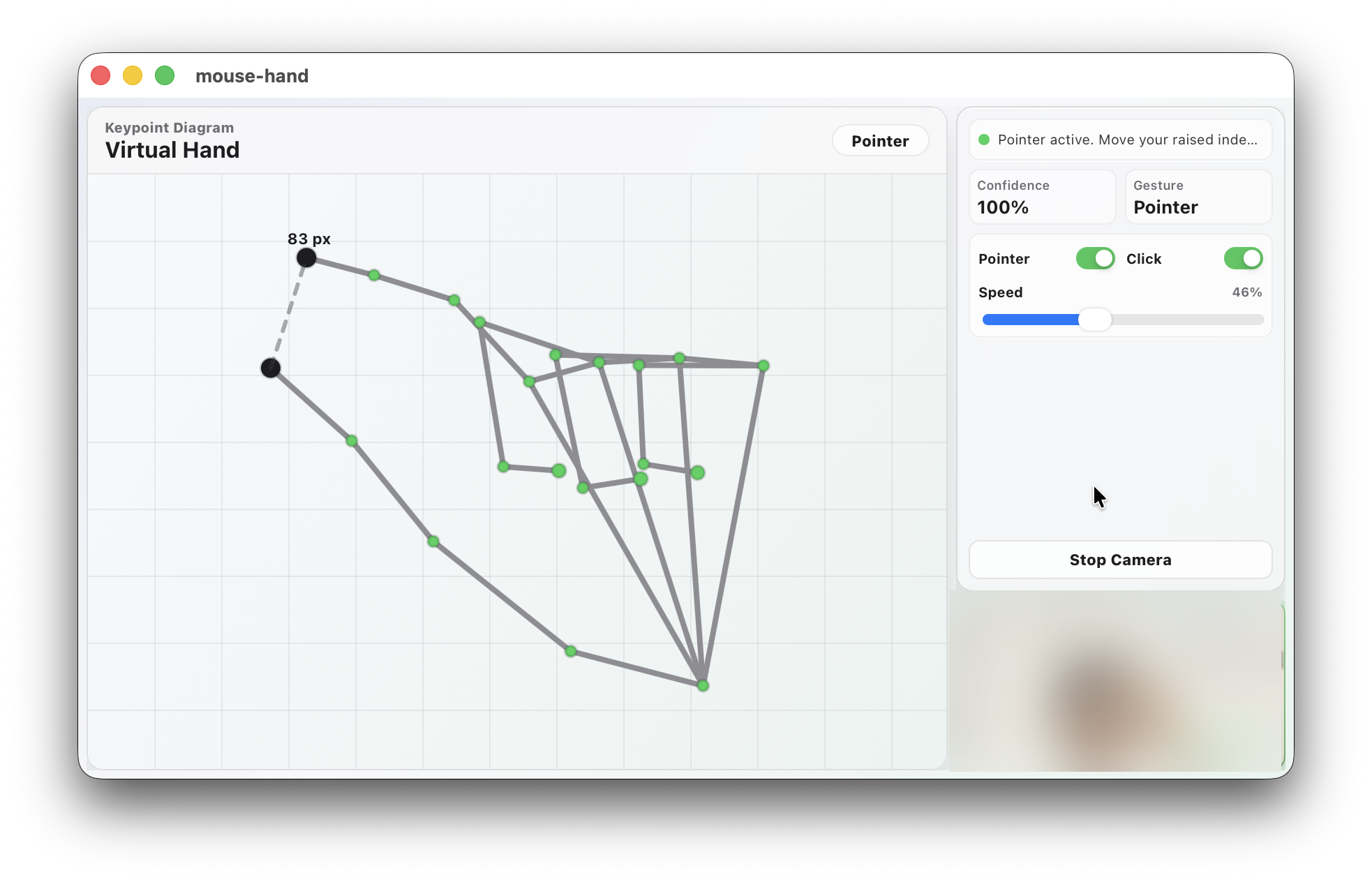
The interface is small because Mouse Hand behaves more like a utility than a dashboard.
It includes:
- A large diagram of the detected hand.
- A compact camera view.
- Controls to enable or disable pointer movement and clicking.
- A speed slider.
- Live gesture status and model confidence.
The hand diagram turned out to be one of the most useful parts of the project.
With computer vision, the problem is often not that the model fails, but that you don’t know exactly what it sees. Visualizing the hand points made it much easier to tune gestures and understand why some interactions felt odd.
Technical stack
- Tauri for the desktop app and native commands.
- SvelteKit for the interface.
- Bun for the development environment.
- TensorFlow.js hand pose detection for hand tracking.
- MediaPipe Hands as the detection model.
- Rust + Enigo to move the mouse, click, and send mouse-down and mouse-up actions.
What I learned
The hard part wasn’t detecting a hand.
It was making the gestures feel intentional.
A few small details made a big difference:
- Smoothing movement to prevent jumps.
- Adding speed control.
- Making the pinch gesture less sensitive.
- Using mouse-down and mouse-up instead of a simple click, so drag and drop would work.
- Showing detected points to debug what the model understood.
I like projects like this because they make you close the whole loop: camera, hand, keypoints, gesture, native action, and visual feedback.
It goes beyond a polished demo. You can feel it in your body.
Why it fits my vibe-coding project
For me, vibe coding isn’t asking AI to do everything and accepting the first result.
It’s a way to speed up exploration, try unusual ideas, and keep the creative flow going while I continue making product, design, and implementation decisions.
Mouse Hand fits that exploration because it brings together:
- An idea that’s easy to explain.
- An interesting technical challenge.
- A small but useful interface.
- An interaction you can try right away.
- An imperfect but tangible result.
That’s the kind of prototype I want to build more often: projects that start as a question and end as something I can use, touch, break, and improve.
Code
The code is available on GitHub:
github.com/juliandavidmr/mouse-hand
To run it locally:
bun install
bun run tauri dev
On macOS, the app needs camera permission.
It also needs Accessibility permission to control the system cursor.